


This Decktopus AI Review explains how the AI presentation tool helps professionals and students create stunning decks instantly — with a detailed look at its features, usability, and 2025 pricing.
Introduction
Presentations are a universal skill — yet creating them still takes hours. Between design, layout, and structure, building a good deck can feel like a full-time job.
Enter Decktopus AI, a next-generation presentation builder that combines AI-driven content generation with automatic slide design to help you craft professional decks in minutes.
This Decktopus AI Review breaks down how it works, its key features, usability, pricing, and who it’s best for. Whether you’re a student preparing for a pitch or a marketer needing slides for a client meeting, this review will tell you if Decktopus AI can truly replace PowerPoint and Canva for your workflow.
What Is Decktopus AI?
Decktopus AI is an AI-powered presentation creation platform that automatically writes, designs, and formats slides based on a topic or short text prompt.
You simply describe your presentation idea — for example:
“Create a 10-slide deck about digital marketing trends for 2025.”
Within seconds, Decktopus generates:
- Slide content (titles, bullets, key talking points)
- Professionally designed layouts
- Image and icon suggestions
- A complete presentation ready to download or share online
This Decktopus AI Review finds the tool most appealing to students, educators, business professionals, and sales teams — anyone who needs quick, professional, and visually clean slides.
Read Typewise AI Review (Features, Pros, Cons & Pricing)
How Decktopus AI Works (Step-by-Step)
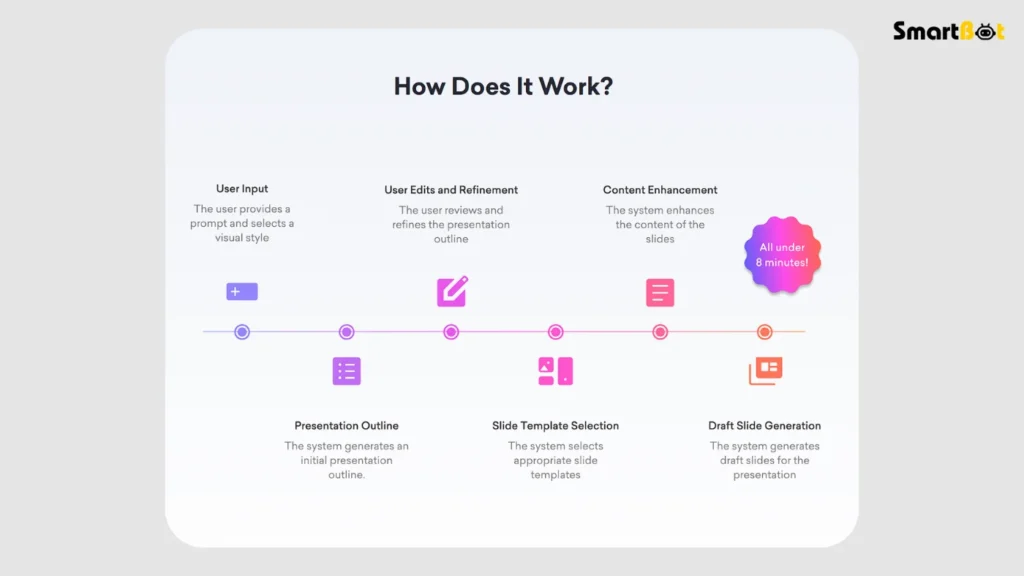
- Choose a Presentation Type
Select the category — Business, Education, Pitch Deck, Report, or Custom. - Enter a Topic or Prompt
Type a simple sentence describing your presentation idea. Decktopus AI then uses its content model to generate structure, key points, and slide titles. - Customize Design and Layout
Choose from dozens of modern templates, color palettes, and fonts. Decktopus automatically applies the chosen style across all slides for a cohesive look. - Edit or Expand Content
You can regenerate slides, rephrase text, or add AI-generated speaker notes. The AI ensures each slide maintains visual balance and text consistency. - Add Images, Icons, and Links
Decktopus integrates a media library for relevant visuals, or you can upload your own. - Download or Share
Export the deck as a PowerPoint file, PDF, or share a live interactive presentation link.
In testing for this Decktopus AI Review, the platform created a 12-slide marketing strategy deck in under three minutes — fully formatted and presentation-ready.
Key Features of Decktopus AI
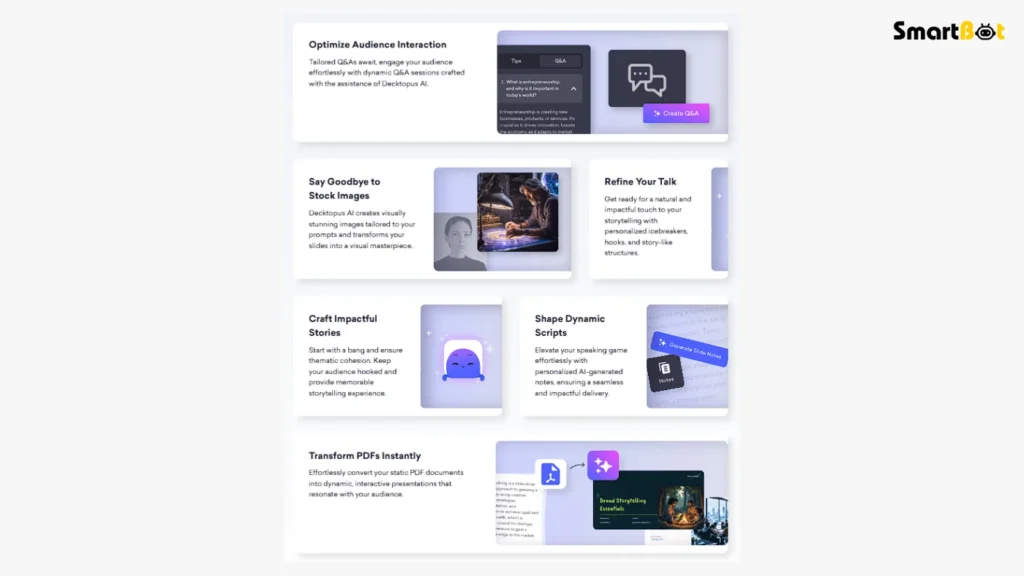
1️⃣ AI-Powered Slide Generation
The main feature: Decktopus uses GPT-based text generation to create entire presentations automatically.
You don’t need to brainstorm structure — the AI determines flow, slide count, and headlines.
2️⃣ Smart Design Automation
Decktopus applies auto-layout and theme consistency across all slides.
It adjusts spacing, font sizes, and contrast automatically, making decks look “professionally designed” without design experience.
3️⃣ AI Speaker Notes
Each slide includes optional speaker notes generated by the AI.
This Decktopus AI Review found them helpful for beginners — especially in academic or sales settings.
4️⃣ Templates & Branding
Decktopus offers templates for various use cases: startup pitch decks, investor reports, educational lectures, marketing proposals, etc.
Pro users can upload brand colors and logos for consistent company visuals.
5️⃣ Collaboration Mode
Invite team members to co-edit or review decks in real time. Perfect for marketing teams and classrooms.
6️⃣ Image & Icon Integration
Built-in access to royalty-free images and icons — reducing dependency on external sources like Unsplash or Pexels.
7️⃣ Analytics & Viewer Tracking
For shared decks, Decktopus provides analytics — who viewed, for how long, and which slides had the most engagement.
This Decktopus AI Review highlights it as a unique edge over traditional PowerPoint.
8️⃣ AI Rewriter & Improver
Beyond creation, you can rephrase entire slides using AI suggestions. It enhances tone, clarity, and engagement — helpful for non-native English speakers.
Hands-On Experience & Testing Insights
For this Decktopus AI Review, I created two decks:
- A business presentation on “Remote Work Trends”
- A class lecture on “Digital Transformation in Education”
Setup & Interface:
The dashboard is clean and modern. Even first-time users can navigate easily.
Content generation starts instantly, and editing feels smooth.
Design Output:
The designs were minimal, professional, and aligned — no text misalignment or formatting errors.
However, visual variety across templates is still limited.
Content Quality:
AI-generated slides were surprisingly well-structured, though some bullet points felt generic.
Rewriting features fixed that quickly.
Performance:
Exporting as PDF and PowerPoint was seamless; transitions worked perfectly on both desktop and mobile.
In conclusion, this Decktopus AI Review found the platform fast, reliable, and accessible — especially for users who care about time saved over total design freedom.
Read Gamma App Review (Features, Pros, Cons & Pricing)
Use Cases & Ideal Audiences
This Decktopus AI Review identifies five major user groups who benefit most:
- Students: Create assignments, reports, or thesis presentations effortlessly.
- Educators: Generate visually appealing lectures and teaching decks in minutes.
- Business Professionals: Save hours on corporate reports and client proposals.
- Startups & Founders: Build investor-ready pitch decks without hiring a designer.
- Agencies & Freelancers: Deliver branded presentations at scale.
Pros of Decktopus AI

- Extremely fast deck creation: A full presentation ready within minutes.
- AI-generated structure and design: No need for separate content or layout planning.
- Clean, modern templates: Consistent typography and colors across slides.
- Built-in speaker notes: Great for students and business presenters.
- Collaboration support: Real-time teamwork makes editing smoother.
- Live sharing & analytics: Lets users track views and engagement.
- Affordable entry plan: Lower cost than hiring a designer or using premium PowerPoint templates.
This Decktopus AI Review found that its biggest strength is how it removes the two hardest parts of presentation building — writing and formatting — at once.
Cons of Decktopus AI
- Limited creative control: You can’t deeply customize slide layouts or animations.
- Generic AI writing at times: Content may need personalization for specific industries.
- Few advanced transitions: Basic animations only; not ideal for design-heavy users.
- Dependent on internet connection: Full functionality requires stable online access.
- Branding locked in lower tiers: Full brand-kit integration available only in higher plans.
Despite these minor setbacks, this Decktopus AI Review concludes that it’s one of the most efficient tools for everyday presentation needs, not a replacement for design software like Keynote or Canva.
Comparison Table — Decktopus AI vs Competitors
| Feature | Decktopus AI | Beautiful.ai | Tome AI |
|---|---|---|---|
| AI Slide Generation | ✅ Yes | ✅ Yes | ✅ Yes |
| Speaker Notes | ✅ Automatic | ❌ No | ✅ Partial |
| Design Customization | ⭐⭐⭐ (3/5) | ⭐⭐⭐⭐ (4/5) | ⭐⭐½ (2.5/5) |
| Collaboration Tools | ✅ Yes | ✅ Yes | ✅ Yes |
| Branding Features | ⭐⭐⭐⭐ (4/5) | ⭐⭐⭐ (3/5) | ⭐⭐ (2/5) |
| Analytics & Tracking | ✅ Available | ❌ No | ❌ No |
| Best For | Students, Marketers | Designers | Storytellers |
This Decktopus AI Review finds it’s better for speed and business readiness, while Beautiful.ai appeals to designers who want more visual control.
Pricing & Plans (As of 2025)
| Plan | Monthly Price | Best For | Features |
|---|---|---|---|
| Free Plan | $0 | Students & testers | Limited templates, AI content for 5 slides, basic sharing |
| Pro Plan | $4.99 / month | Professionals & freelancers | Unlimited slides, templates, AI notes, downloads |
| Business Plan | $14.99 / month | Teams & agencies | Branding tools, collaboration, analytics, priority support |
| Enterprise | Custom Quote | Large organizations | API access, team dashboards, data security options |
💡 Note: Annual subscriptions reduce the cost by about 30%.
In this Decktopus AI Review, the Pro Plan offers the best value for regular users — especially those who prepare decks weekly or for client presentations.
Who Should Use Decktopus AI (and Who Shouldn’t)

✅ Ideal Users
- Students: Need to build slides quickly for assignments.
- Corporate professionals: Want consistent decks without wasting time on formatting.
- Educators: Prepare visually structured lectures fast.
- Startups & freelancers: Build quick pitch decks or client proposals.
❌ Not Ideal For
- Designers: Who prefer full creative control.
- Offline users: Internet access is required for generation and edits.
- Enterprises needing strict brand compliance: Some advanced controls are in higher-tier plans only.
This Decktopus AI Review identifies it as the perfect middle-ground tool — smarter than PowerPoint, simpler than Figma, and faster than Canva for decks.
Read HyperWrite AI Review 2025 (Features, Pros, Cons & Pricing)
Verdict Summary Table (Authentic Ratings)
| Category | Rating | Comment |
|---|---|---|
| Ease of Use | ⭐⭐⭐⭐⭐ (5/5) | Simple, fast, and beginner-friendly. |
| AI Output Quality | ⭐⭐⭐½ (3.5/5) | Clear and structured but can feel generic. |
| Design Aesthetic | ⭐⭐⭐⭐ (4/5) | Clean templates, balanced layouts. |
| Collaboration | ⭐⭐⭐⭐½ (4.5/5) | Smooth real-time edits and sharing. |
| Pricing | ⭐⭐⭐⭐½ (4.5/5) | Excellent value at Pro tier. |
| Performance & Stability | ⭐⭐⭐⭐ (4/5) | Reliable web app, minimal lag. |
| Overall Rating | ⭐⭐⭐⭐ (4.2/5) | Fastest AI deck maker for everyday users; great value for students and marketers. |
💬 True Verdict:
Decktopus AI is a productivity-first presentation tool. It’s not here to replace designers — it’s here to empower non-designers to create impactful, professional decks instantly.
If your goal is speed, structure, and simplicity, this Decktopus AI Review confirms that Decktopus is one of the smartest investments you can make in 2025.
Final Thoughts
This Decktopus AI Review proves that AI presentation tools have finally matured.
Decktopus isn’t about flashy transitions — it’s about cutting the clutter between your idea and your presentation.
Its ability to write, design, and align slides instantly makes it a must-have for:
- Students who value productivity,
- Professionals who need frequent pitch decks,
- Teams working on tight deadlines.
For deep designers, PowerPoint or Canva still offer greater artistic flexibility.
But for everyone else, Decktopus AI wins the efficiency game hands down — no stress, no design skill, no wasted time.
🎯 Decktopus AI: From idea to impact, faster than any other deck builder.
FAQ Section
Q1. Is Decktopus AI free to use?
Yes, there’s a free plan with basic features and limited slides.
Q2. Does Decktopus AI create visuals too?
It suggests relevant images and icons from its integrated media library.
Q3. Can I export Decktopus AI presentations to PowerPoint?
Yes, exports to PowerPoint (.PPTX) and PDF formats are available.
Q4. Does Decktopus AI support team collaboration?
Yes. Multiple users can edit decks in real time with version tracking.
Q5. How accurate is Decktopus AI-generated content?
For business and academic topics, it’s very accurate. Creative decks may require edits for tone.
Q6. Does Decktopus store my data?
All content is stored securely and can be deleted anytime from your account settings.
Q7. What makes Decktopus different from PowerPoint?
AI automation — it writes and designs your presentation simultaneously, saving hours of manual effort.

