


This Taplio Review explores how the AI-powered LinkedIn growth tool helps professionals create viral posts, grow followers, and manage personal branding — with updated 2025 pricing and features.
Introduction
In this Taplio Review, we’ll explore one of the most popular AI tools built specifically for LinkedIn creators and marketers.
LinkedIn has evolved into more than a networking platform — it’s a content stage, where visibility and engagement can shape careers and brands.
Enter Taplio — a platform that combines AI writing assistance, post scheduling, and personal branding analytics into a single tool.
Its promise is simple: help you grow faster on LinkedIn with less time spent writing, planning, or guessing what works.
But does Taplio actually deliver measurable growth, or is it just another AI writing assistant dressed in social media clothing?
This Taplio Review digs into its features, workflow, pricing, and overall performance to find out.
What Is Taplio?
Taplio is an AI-powered LinkedIn growth and content management tool designed for professionals, founders, and social media teams.
It helps users:
- Create high-performing LinkedIn posts using AI
- Schedule and publish consistently
- Analyze engagement metrics
- Build stronger relationships through lead tracking
What makes Taplio unique — as uncovered in this Taplio Review — is its laser focus on LinkedIn.
Unlike general social media tools, Taplio’s data models are trained specifically on LinkedIn’s engagement dynamics: tone, storytelling, and post structures that drive reach.
Read Durable AI Review (Features, Pros, Cons & Pricing)
How Taplio Works (Step-by-Step)
- Connect Your LinkedIn Account
Once you log in, Taplio syncs your LinkedIn profile and previous post history to understand your content style and niche. - Generate Post Ideas
Using AI, Taplio suggests trending topics and formats (threads, stories, advice posts) tailored to your profile audience. - Write with AI Assistance
The built-in editor creates complete posts from prompts like “Share a marketing lesson from 2024” or “Explain what leadership means in one story.”
The AI structures it with hooks, body, and CTA optimized for engagement. - Schedule and Queue Content
You can plan weekly or monthly content calendars and let Taplio auto-post based on best engagement times. - Track Analytics
Taplio’s dashboard shows detailed engagement insights — likes, comments, followers gained, and performance of each post type. - Engage and Build Relationships
Taplio includes a “Relationship Builder” that lets you monitor potential leads or partners by tracking their activity and commenting intelligently.
In our Taplio Review testing, it took less than 15 minutes to set up and generate a week’s worth of ready-to-post LinkedIn content — an impressive feat for solo creators and agencies alike.
Key Features of Taplio
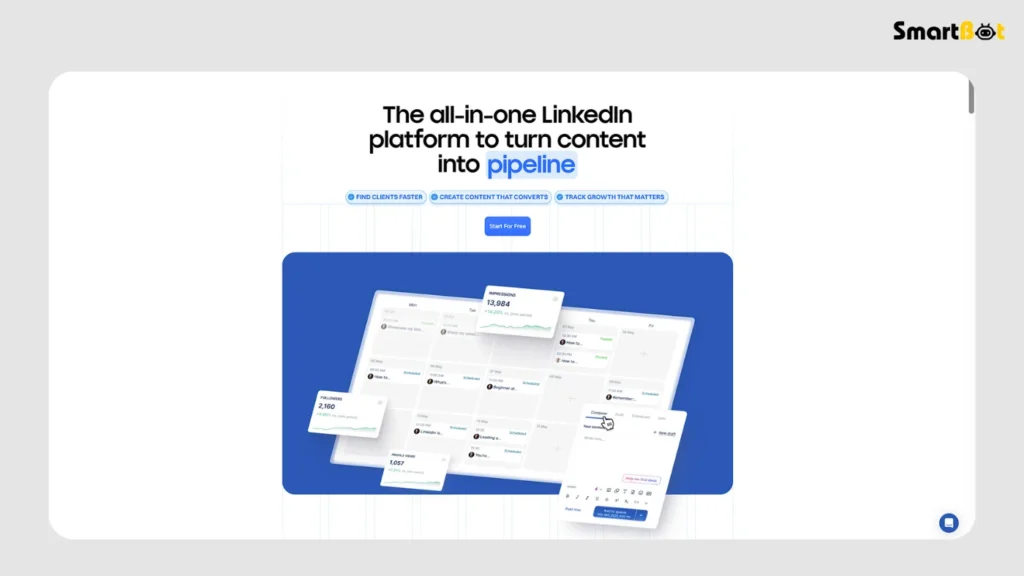
Below are the top features that make Taplio stand out in this Taplio Review.
1️⃣ AI Post Generator
Taplio’s AI creates content using proven engagement frameworks. Whether you want storytelling posts, industry insights, or opinion pieces, the system generates context-aware text aligned with your tone and past performance.
During testing for this Taplio Review, prompts like “write a short post about personal growth at work” produced polished, conversational results within seconds.
2️⃣ Viral Post Inspiration Feed
Taplio curates a live feed of top-performing LinkedIn posts across industries.
You can filter by category (marketing, startups, tech, personal branding) and repurpose ideas for your own strategy.
This database is updated daily and helps overcome writer’s block — a standout advantage compared to tools like ChatGPT or Jasper that lack platform-specific trends.
3️⃣ Post Scheduling & Automation
The content calendar lets you schedule weeks of content ahead of time.
It automatically posts at optimal hours based on your audience’s activity — a huge timesaver for professionals who can’t manually post daily.
The queue is visually organized and supports multiple profiles, which makes Taplio valuable for marketing agencies handling multiple client pages.
4️⃣ Analytics Dashboard
Taplio’s analytics are detailed yet digestible.
Metrics include:
- Average engagement per post
- Top-performing post types (carousel, text, or image)
- Follower growth rate over time
- Audience reaction breakdown
This Taplio Review found the insights practical and actionable — especially for refining post types that resonate most with your audience.
Read UiPath Review 2025 (Features, Pros, Cons & Pricing)
5️⃣ Lead Management System
Taplio includes a lightweight CRM that lets you track potential leads and influencer interactions.
You can see who engages with your posts, tag them by interest, and follow up later.
For B2B creators, this merges content creation and relationship nurturing in one dashboard.
6️⃣ AI Comment & Engagement Assistant
The “Engage” feature suggests smart, personalized comments for other people’s posts — helping you maintain visibility and build credibility without sounding robotic.
This is particularly useful for creators who want to grow their presence organically by networking consistently.
7️⃣ Team Collaboration
Teams can share calendars, analytics, and drafts.
The shared workspace setup allows managers to review or approve posts before they go live — making Taplio suitable for agencies or content teams managing executives.
8️⃣ Chrome Extension
Taplio’s browser extension lets you generate posts, analyze engagement, or save ideas directly from your LinkedIn feed — keeping your workflow uninterrupted.
Hands-On Experience & Testing Insights
To test Taplio for this Taplio Review, I used it for two weeks to publish posts on a professional account (marketing-focused audience).
Here’s what stood out:
- Ease of Use: The interface is intuitive. You can go from idea → draft → scheduled post in under 5 minutes.
- AI Writing Quality: Strong structure and tone consistency. Posts sounded natural and relatable, not robotic.
- Analytics: Clear insights that genuinely helped adjust content strategy.
- Scheduling: Smooth automation, no failed posts during testing.
- Community Value: Taplio’s feed of viral posts inspired content almost daily.
In short, this section of the Taplio Review confirmed that Taplio significantly streamlines the LinkedIn content creation process — perfect for creators, consultants, and brand teams.
Read Relevance AI Review (Features, Pros, Cons & Pricing)
Pros of Taplio
- AI built for LinkedIn: Not a generic writer; trained on actual LinkedIn engagement data.
- Viral post feed: Helps you learn from real-world examples that already perform well.
- Efficient scheduling: Saves massive time for creators managing consistent posting.
- Smart engagement assistant: Suggests genuine comments to build network presence.
- Data-driven analytics: Easy to interpret, even for non-marketers.
- Good UX and Chrome extension: Smooth, fast, and beginner-friendly.
This Taplio Review found the tool’s content engine and community feed to be its standout value — both useful and genuinely time-saving.
Cons of Taplio
- Expensive for casual users: Pricing starts high compared to alternatives like AuthoredUp.
- AI creativity sometimes repetitive: Generated content can feel templated if overused.
- Limited platform scope: Works only for LinkedIn — no cross-posting to X, Threads, or Facebook.
- Analytics depth is basic: Lacks advanced sentiment or keyword insights found in pro tools.
- Occasional connection lag: LinkedIn’s API limits can delay post-scheduling syncs.
While none of these are deal-breakers, this Taplio Review highlights that Taplio is built for professionals serious about LinkedIn growth — not casual users.
Comparison Table — Taplio vs Competitors
| Feature | Taplio | AuthoredUp | Typefully |
|---|---|---|---|
| AI Post Writing | ✅ Yes | ⚪ Limited | ✅ Yes (Twitter-based) |
| Viral Post Library | ✅ Huge database | ❌ No | ❌ No |
| Analytics Dashboard | ⭐⭐⭐⭐ (4/5) | ⭐⭐⭐⭐½ (4.5/5) | ⭐⭐⭐ (3/5) |
| Post Scheduling | ✅ Yes | ⚪ Manual posting | ✅ Yes |
| Engagement Assistant | ✅ AI-based | ❌ No | ❌ No |
| Pricing (Starting) | 💲💲💲 ($39/mo) | 💲💲 ($19/mo) | 💲 ($12/mo) |
| Best For | LinkedIn creators | Personal brands | Twitter/X creators |
This Taplio Review finds that while AuthoredUp excels in analytics and affordability, Taplio leads in AI assistance and community-driven ideation.
Pricing & Plans (As of 2025)
| Plan | Monthly Price (approx.) | Best For | Key Features |
|---|---|---|---|
| Starter Plan | $39 / month | Solo creators, consultants | AI writing, viral post library, analytics |
| Pro Plan | $59 / month | Coaches, agencies, and teams | Lead tracking, CRM, content queue, collaboration |
| Enterprise | Custom quote | Larger marketing teams | API access, bulk accounts, advanced support |
💡 Note: Taplio occasionally offers discounts when bundled with its sister product Tweet Hunter, which manages X (Twitter) content.
During testing for this Taplio Review, the Pro Plan felt like the sweet spot — enough automation and analytics without overpaying.
Who Should Use Taplio (and Who Shouldn’t)
✅ Ideal Users
- LinkedIn creators and consultants posting daily.
- B2B founders and marketers building personal brands.
- Agencies managing executive or company accounts.
- Content teams needing AI-assisted workflows.
❌ Not Ideal For
- Casual LinkedIn users who post occasionally.
- Enterprises needing deep analytics or multi-platform tools.
- Users on a tight budget, as Taplio’s pricing can feel steep.
This Taplio Review concludes that Taplio shines for LinkedIn-focused creators, but might not justify its cost for small-scale use.
Read HyperWrite AI Review 2025 (Features, Pros, Cons & Pricing)
Verdict Summary Table (Authentic Ratings)
| Category | Rating | Comment |
|---|---|---|
| Ease of Use | ⭐⭐⭐⭐½ (4.5/5) | Clean interface; minimal learning curve. |
| AI Writing Quality | ⭐⭐⭐½ (3.5/5) | Good structure, but tone can repeat. |
| Features | ⭐⭐⭐⭐ (4/5) | Excellent scheduling and feed tools. |
| Analytics | ⭐⭐⭐½ (3.5/5) | Functional, not deep. |
| Pricing | ⭐⭐⭐ (3/5) | Higher cost for solopreneurs. |
| Value for Money | ⭐⭐⭐½ (3.5/5) | Worth it for active creators only. |
| Overall Rating | ⭐⭐⭐⭐ (4/5) | Excellent for LinkedIn growth, but pricey for light users. |
💬 Real Verdict: Taplio isn’t perfect — but for serious creators, it’s one of the best AI-powered content systems currently available for LinkedIn.
Final Thoughts
This Taplio Review makes one thing clear: Taplio isn’t just another AI writer — it’s a LinkedIn-specific growth ecosystem.
Between its viral post inspiration feed, AI writing tools, and robust scheduling features, Taplio can turn LinkedIn content creation from a chore into a streamlined workflow.
However, it’s not for everyone. The pricing leans professional, and the platform doesn’t extend beyond LinkedIn. But for those focused solely on that ecosystem — Taplio delivers unmatched results.
If you’re a founder, marketer, or content creator looking to grow influence on LinkedIn, this Taplio Review confidently recommends trying Taplio for at least one month — you’ll see the time savings and content improvement almost instantly.
FAQ Section
Q1. Is Taplio free?
No, Taplio doesn’t have a permanent free plan, but it offers a trial to test features before subscribing.
Q2. Does Taplio work on mobile?
It’s web-based but fully responsive, accessible via browsers on mobile devices.
Q3. Can Taplio manage multiple LinkedIn accounts?
Yes, the Pro and Enterprise plans support multiple profiles or team accounts.
Q4. Does Taplio support AI commenting on others’ posts?
Yes. The “Engage” feature helps generate authentic replies to increase visibility.
Q5. How accurate are Taplio’s analytics?
Quite accurate for engagement tracking, but lacks deeper metrics like audience demographics.
Q6. What’s the biggest advantage of Taplio over other tools?
Its LinkedIn-specific AI training and viral content library — features no other tool replicates at the same level.

