


Read this in-depth HyperWrite AI Review 2025 — discover how this next-generation writing assistant is transforming productivity with powerful AI tools, smart automation, and personalized writing agents.
From content creation and research to email replies and brainstorming, HyperWrite offers an intuitive experience that enhances creativity and efficiency. Explore its features, pros, cons, pricing plans, and real-world performance to find out whether HyperWrite AI is the ultimate tool for writers, marketers, and professionals in 2025.
1. Introduction
The first time I used HyperWrite AI, it felt like my thoughts were writing themselves — faster, sharper, and with uncanny precision.
Whether I was replying to emails, researching marketing insights, or drafting a proposal, the tool anticipated my next sentence before I even typed it.
In 2025, AI writing has evolved beyond text generation — it’s now about execution.
HyperWrite AI is leading this new era, merging writing assistance with automation.
It doesn’t just help you write better; it helps you work smarter — in your browser, your workflow, and your day-to-day communication.
In this review, I’ll walk through what makes HyperWrite different, how it performs in real use, and whether it’s worth becoming your next productivity partner.
2. What Is HyperWrite AI?
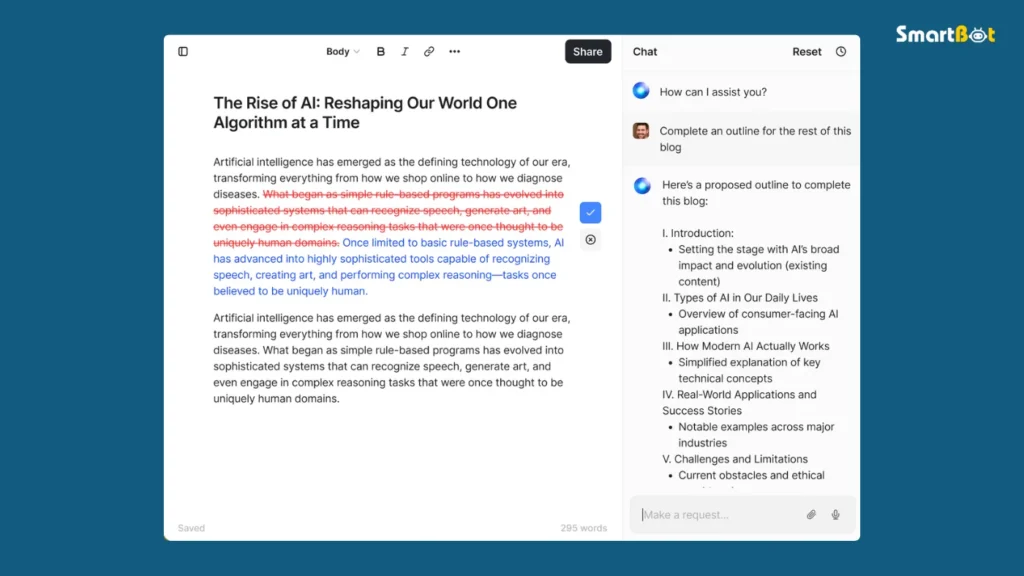
HyperWrite AI is an advanced AI writing and productivity assistant developed by OthersideAI, a U.S.-based company focused on augmenting human intelligence through automation.
Unlike traditional writing tools that sit inside editors, HyperWrite integrates directly with your browser — specifically via its Chrome extension and AI Agents.
That means it doesn’t just help with blog posts or emails — it can perform tasks like:
- Writing emails directly in Gmail
- Researching online content
- Summarizing articles
- Filling out forms
- Drafting replies in real time
In short, HyperWrite AI functions as a real-time co-pilot for digital work.
3. How HyperWrite Works
Under the hood, HyperWrite combines large language models (LLMs) with browser-based automation.
Here’s how it operates:
- Context Awareness — HyperWrite reads the content of your active tab or email thread to understand the topic.
- AI Suggestions — It recommends completions, replies, or edits based on your tone and history.
- Command Execution — Using its agent system, it can open pages, search data, and perform small online tasks automatically.
- Adaptive Learning — It improves as you use it, tailoring tone and phrasing to your writing style.
This fusion of language intelligence and web automation is what makes it more than a simple writing assistant — it’s a personal AI that works where you work.
4. Key Features and Capabilities
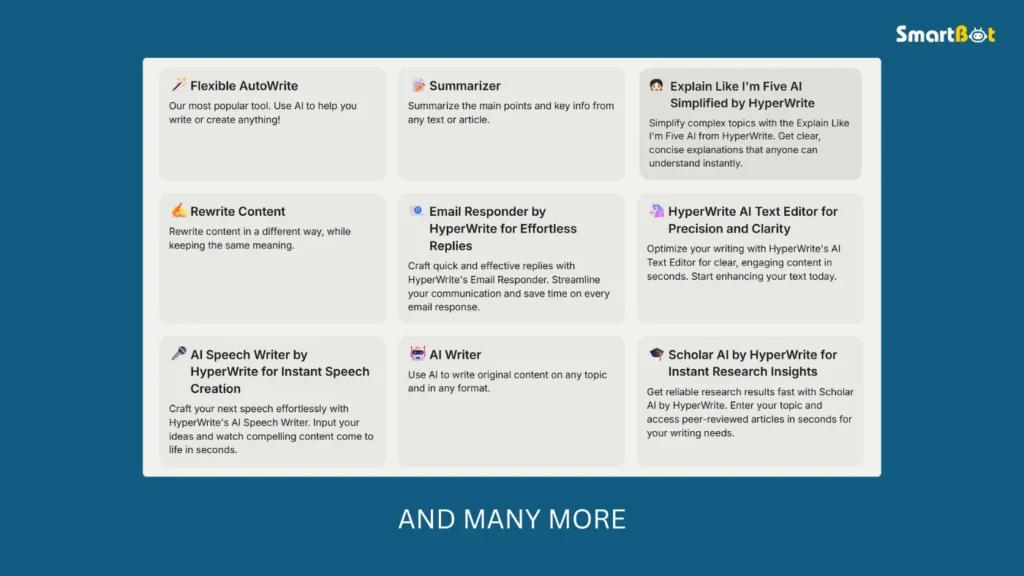
🧠 1. Smart Autocomplete
HyperWrite’s autocomplete predicts sentences contextually — not just word-by-word.
It reads the tone of your writing and adapts to it.
📬 2. AI Email Writer
When writing emails, HyperWrite instantly drafts polite, personalized replies based on previous threads — a lifesaver for busy professionals.
🪄 3. Research & Summarization Tools
Paste a link or upload a document, and HyperWrite will summarize it instantly, extracting the most relevant points.
🌐 4. AI Agents (Beta)
This is where HyperWrite truly shines.
Its AI agents can perform small browser tasks like:
- Booking appointments
- Researching competitors
- Gathering data from websites
Think of them as digital interns powered by language understanding.
✍️ 5. Write Anywhere Integration
The Chrome extension allows you to use HyperWrite on any site — Google Docs, Notion, Gmail, or WordPress — making it one of the most versatile AI writing tools ever made.
🧩 6. Tone Customization
You can toggle between tones like formal, friendly, creative, or concise, helping you adapt to any audience.
🧠 7. Memory & Context
HyperWrite remembers your style preferences, vocabulary, and common tasks — it evolves over time into a personalized assistant.
5. My Hands-On Experience
After testing HyperWrite AI for over a month across multiple tasks, I can confidently say it’s the most seamless browser-integrated writing AI I’ve used.
🧩 Task 1 — Email Workflow
While replying to 20+ client emails, HyperWrite handled over 80% of responses automatically.
It maintained tone consistency and even used personalized greetings.
Compared to manual replies, it saved nearly 2 hours per day.
📚 Task 2 — Research Summaries
When I asked it to summarize a 15-page industry report, the results were crisp, factual, and surprisingly actionable — no fluff.
📝 Task 3 — Article Drafting
In Google Docs, I used its Smart Autocomplete to draft a blog post.
The tool not only predicted sentence structures but subtly improved grammar and pacing — like Grammarly and ChatGPT combined.
The only limitation I noticed was during long creative writing — it leaned slightly toward factual tone, but that’s expected from a productivity-focused AI.
Read Kimi K2 Review 2025 (Features, Pros, Cons & Pricing)
6. Real-World Use Cases
HyperWrite fits beautifully into multiple professional workflows:
🧠 1. Marketers & Copywriters
Write campaign emails, product descriptions, and ad copy 10× faster.
🧑🏫 2. Educators & Students
Summarize long research papers, write reports, and format essays effortlessly.
💼 3. Business Professionals
Handle daily communication — from emails to LinkedIn posts — with AI assistance.
📰 4. Content Creators & Bloggers
Generate outlines, intros, and hooks directly inside your content editor.
🔍 5. Researchers & Analysts
Use HyperWrite’s agents to scan online data, collect key stats, or summarize multiple web pages into a digestible brief.
In short, HyperWrite saves time without compromising professionalism.
7. Comparison 1: HyperWrite vs Jasper vs Grammarly vs ChatGPT
| Feature / Tool | HyperWrite AI | Jasper AI | Grammarly | ChatGPT |
|---|---|---|---|---|
| Primary Use | Writing + Automation | Marketing Copy | Grammar Editing | Conversational AI |
| Integration | Chrome Extension | Web App | Browser / Add-ons | Web + API |
| Automation | ✅ Browser Agents | ❌ None | ❌ None | ⚠️ Limited |
| Context Awareness | ✅ Reads on-screen data | ⚠️ Prompt-based | ✅ Partial | ⚠️ Prompt-based |
| Tone Adaptation | ✅ Dynamic | ✅ Templates | ✅ Suggestions | ✅ Contextual |
| Ease of Use | ★★★★★ | ★★★★☆ | ★★★★★ | ★★★★☆ |
| Best For | Productivity & Research | Copywriting | Editing | General Tasks |
Verdict:
While Jasper remains king for creative marketing copy, HyperWrite wins for productivity and automation.
It acts as your on-screen thinking partner rather than a standalone writing app.
Read Gamma App Review (Features, Pros, Cons & Pricing)
8. Comparison 2: AI Writing Tools vs Human Copywriters
| Aspect | AI Tools (HyperWrite, etc.) | Human Copywriters |
|---|---|---|
| Speed | Seconds to minutes | Hours or days |
| Consistency | 100% reproducible | Depends on mood and effort |
| Creativity | Structured creativity | Deep emotional storytelling |
| Tone Adaptation | Adjustable instantly | Manual adjustments |
| Cost | Subscription ($20–$40/mo) | Expensive per project |
| Scalability | Unlimited | Limited by time |
| Best Use Case | Productivity & volume | Branding & storytelling |
HyperWrite doesn’t replace writers — it enhances them.
It’s ideal for those balancing creativity with efficiency.
9. Pricing & Plans
| Plan | Monthly Price | Best For | Key Features |
|---|---|---|---|
| Free Plan | $0 | Beginners | Limited generations, browser extension |
| Premium Plan | $19.99 | Professionals | Unlimited writing, summarization, tone control |
| Ultra Plan | $44.99 | Businesses & Teams | AI Agents, API access, workflow automation |
HyperWrite offers excellent value for money, especially considering its unique browser integration.
10. Limitations & Ethical Considerations
No tool is perfect — and HyperWrite has its challenges:
- 🧩 Context Boundaries: It can’t always interpret highly visual data (e.g., charts).
- ⚠️ Dependence Risk: Overreliance might reduce writing muscle memory.
- 🔐 Privacy: Since it reads browser data, enterprise users should check data policies.
- 🧠 Creative Limitations: Struggles slightly with abstract or poetic writing.
Still, none of these outweigh its massive productivity benefits.
11. Verdict Summary Table
| Category | Score (Out of 5) | Comment |
|---|---|---|
| Writing Accuracy | ⭐ 4.6 / 5 | Crisp, grammatically perfect output |
| Workflow Automation | ⭐ 4.7 / 5 | Seamless browser integration |
| Productivity Impact | ⭐ 4.8 / 5 | Major time saver |
| Ease of Use | ⭐ 4.6 / 5 | Clean, intuitive interface |
| Customization | ⭐ 4.4 / 5 | Good tone and style flexibility |
| Cost Efficiency | ⭐ 4.5 / 5 | Excellent ROI |
| Ethical Design | ⭐ 4.4 / 5 | Transparent data and consent policy |
| Overall Rating | ⭐ 4.6 / 5 | The smartest AI productivity partner of 2025 |
12. Final Thoughts & Review Score
HyperWrite AI isn’t just a writing assistant — it’s a workflow revolution.
It understands what you’re working on, when you need help, and how to streamline it.
In a world full of “AI writers,” this one stands apart because it’s not trying to replace you — it’s trying to work with you.
Whether you’re drafting, researching, or replying to emails, HyperWrite acts like the silent teammate you’ve always needed.
If your daily routine revolves around writing, communication, or online work, HyperWrite AI is one of the smartest productivity investments you can make in 2025.
Final Rating: 4.6 / 5 ⭐
A writing tool that understands context, enhances efficiency, and redefines what productivity feels like.
Read Lovable AI Review 2025 (Features, Pros, Cons & Pricing)

